
MSSQL Microsoft SQL Server Management Studio 2008: Error 916
페이지 정보


본문
SQL Server 2008의 개체 탐색기에서 데이터베이스 폴더를 확장할 때 오류 메시지
Failed to retrieve data for this request. (Microsoft.SqlServer.Management.Sdk.Sfc)
Additional information:
└ An exception occurred while executing a Transact-SQL statement or batch.
(Microsoft.Sql.Server.ConnectionInfo)
└ The server principal “username” is not able to access the database “databasename” under the
current security context. (Microsoft SQL Server, Error: 916)
RESOLUTION
1. Click Start, point to Programs, point to Microsoft SQL Server 2008, and then click SQL Server Management Studio.
2. In the Connect to Server dialog box, click the server that you want in the Server type list, type a server name in the Server name box, and then click Connect.
3. In Object Explorer, click the Databases folder.
4. On the Object Explorer Details page, right-click the column headings, and then click to clear the Collation check box.
5. In Object Explorer, right-click the Databases folder, and then click Refresh.
6. On the File menu, click Exit.
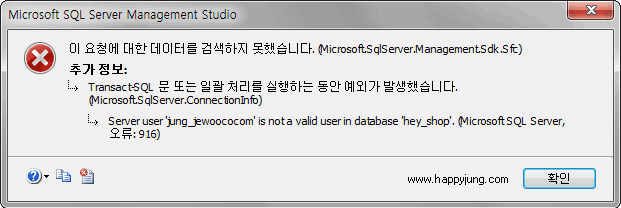
이 요청에 대한 데이터를 검색하지 못했습니다. (Microsoft.SqlServer.Management.Sdk.Sfc)
추가정보
└ Transacti-SQL 문 또는 일괄 처리를 실행하는 동안 예외가 발생했습니다.
(Microsoft.Sql.Server.ConnectionInfo)
└ Server user “username” is not valid user in database “databasename”
(Microsoft SQL Server, 오류: 916)
해결방법
1. 시작 을 누르고, 프로그램, Microsoft SQL Server 2008 차례로 가리킨 다음 SQL Server 관리 Studio 를 클릭하십시오.
2. 서버에 연결 대화 상자에서 서버 유형 목록에서 서버 이름 상자에 서버 이름을 입력하고 [연결]을 클릭하십시오 서버를 클릭하십시오.
3. 개체 탐색기에서 데이터베이스 폴더를 클릭하십시오.
4. 개체 탐색기 정보 페이지의 열 머리글을 마우스 오른쪽 단추로 클릭하고 보기 원래대로 클릭하십시오.
참고개체 탐색기 정보 페이지가 표시되지 않은 경우 F7 키를 누릅니다. 또는 보기 메뉴에서 개체 탐색기 정보 를 클릭합니다.
5. 개체 탐색기에서 데이터베이스 폴더를 마우스 오른쪽 단추로 클릭한 다음 새로 고침 을 클릭하십시오.
6. 파일 메뉴에서 끝내기 를 누릅니다.
참고사이트
http://support.microsoft.com/kb/956214/ko
http://blog.cpugeni.com/archive/2008/09/22/microsoft-sql-server-management-studio-2008-error-916.aspx
Failed to retrieve data for this request. (Microsoft.SqlServer.Management.Sdk.Sfc)
Additional information:
└ An exception occurred while executing a Transact-SQL statement or batch.
(Microsoft.Sql.Server.ConnectionInfo)
└ The server principal “username” is not able to access the database “databasename” under the
current security context. (Microsoft SQL Server, Error: 916)
RESOLUTION
1. Click Start, point to Programs, point to Microsoft SQL Server 2008, and then click SQL Server Management Studio.
2. In the Connect to Server dialog box, click the server that you want in the Server type list, type a server name in the Server name box, and then click Connect.
3. In Object Explorer, click the Databases folder.
4. On the Object Explorer Details page, right-click the column headings, and then click to clear the Collation check box.
5. In Object Explorer, right-click the Databases folder, and then click Refresh.
6. On the File menu, click Exit.
이 요청에 대한 데이터를 검색하지 못했습니다. (Microsoft.SqlServer.Management.Sdk.Sfc)
추가정보
└ Transacti-SQL 문 또는 일괄 처리를 실행하는 동안 예외가 발생했습니다.
(Microsoft.Sql.Server.ConnectionInfo)
└ Server user “username” is not valid user in database “databasename”
(Microsoft SQL Server, 오류: 916)
해결방법
1. 시작 을 누르고, 프로그램, Microsoft SQL Server 2008 차례로 가리킨 다음 SQL Server 관리 Studio 를 클릭하십시오.
2. 서버에 연결 대화 상자에서 서버 유형 목록에서 서버 이름 상자에 서버 이름을 입력하고 [연결]을 클릭하십시오 서버를 클릭하십시오.
3. 개체 탐색기에서 데이터베이스 폴더를 클릭하십시오.
4. 개체 탐색기 정보 페이지의 열 머리글을 마우스 오른쪽 단추로 클릭하고 보기 원래대로 클릭하십시오.
참고개체 탐색기 정보 페이지가 표시되지 않은 경우 F7 키를 누릅니다. 또는 보기 메뉴에서 개체 탐색기 정보 를 클릭합니다.
5. 개체 탐색기에서 데이터베이스 폴더를 마우스 오른쪽 단추로 클릭한 다음 새로 고침 을 클릭하십시오.
6. 파일 메뉴에서 끝내기 를 누릅니다.
참고사이트


댓글목록
등록된 댓글이 없습니다.